
Dementia Care Education App
Healthcare UX • Columbia University
OVERVIEW
I-FASTN (Interactive Functional Assessment Staging Navigator) is a mobile web application designed to help Hispanic family caregivers understand and navigate the functional stages of dementia. I was brought in as the UX/UI designer by Professor Adriana Arcia, PhD, RN at Columbia University, joining an active research project. My work focused on translating a clinically validated assessment framework into an accessible, bilingual digital experience for caregivers with varying levels of health and digital literacy.
Being Hispanic myself made this project personal in a way most work isn't. The target user wasn't a persona, she was familiar.
MY ROLE
UX/UI Designer
COLLABORATION
Adriana Arcia PhD RN (Principal Investigator),
Suzanne Bakken PhD RN FAAN (Co-Investigator),
Open Health Network (App Developer)
TIMELINE
2 years
THE PROBLEM
Hispanic individuals are disproportionately affected by dementia and its caregiving burden, compounded by limited English proficiency and lower health literacy. When a loved one is diagnosed, caregivers are typically handed a general website and told to search. The information exists but it's not staged, tailored, or digestible for someone managing caregiving alongside the rest of their life.
No practical tool existed for caregivers to assess their loved one's current functional stage and connect directly to resources for that stage. The clinical instrument that does this, the Functional Assessment Staging Tool (FAST), was administered by professionals only, and its two-layer structure with up to 16 sub-stages was never designed for lay interpretation.
How might we help Hispanic family caregivers understand where their loved one is in their dementia journey, and know exactly what to do next?
WHO WE DESIGNED FOR

Primary user
Rosa M., 47
Family caregiver, daughter & homemaker
PERSONAL DETAILS
• High school diploma
• Washington Heights, NYC
• Spanish-dominant
• Android smartphone
TECH EXPOSURE
Low - uses WhatsApp and phone calls daily
ABOUT
Rosa cares for her mother with mid-stage dementia while managing her household and two kids. She relies on family networks and community health workers for information, often in Spanish. She has limited time and limited trust in unfamiliar apps.
PATTERNS & BEHAVIORS
• Asks family before doctors
• Uses phone over desktop
• Searches in Spanish
• Evening usage only
• Shares screenshots on WhatsApp
GOALS & MOTIVATIONS
• Understand what's happening
• Feel less alone
• Know what comes next
• Get clear instructions

Secondary user
Mark T., 38
Home health aide, professional caregiver
PERSONAL DETAILS
• Vocational certificate
• iPhone, agency tablet
• Bronx, NYC
• English — bilingual
TECH EXPOSURE
Moderate — comfortable with care apps and scheduling tools
ABOUT
Mark supports 3-4 clients across the week, each at different dementia stages. He's trained in basic care but rarely has time to consult documentation mid-visit. He bridges communication between families and clinical staff.
PATTERNS & BEHAVIORS
• Checks info between visits
• Needs quick reference
• Reports to supervisors
• Manages multiple clients
• Uses agency-provided tools
GOALS & MOTIVATIONS
• Handle behavior changes confidently
• Save time on documentation
• Support families better
• Avoid escalations
RESEARCH
I joined the project with an established clinical framework. My role was to understand the constraints surfacing from research and translate them into interface decisions.
KEY CONSTRAINTS
The staging structure itself was a constraint. FAST has 7 stages, with Stages 6 and 7 subdivided into 5 and 6 sub-stages respectively. Granular enough to be clinically useful. Genuinely difficult for a caregiver to interpret without a guide.

Digital Literacy
Many participants couldn't advance past "Next" without coaching.
Minimal UI wasn't enough for this audience.
Bilingual Experience
English and Spanish designed simultaneously.
Every educational resource curated in both languages.
Design implication
Design for real capabilities, not assumed app literacy.
USABILITY TESTING
Two formal rounds of evaluation:
Round
Who
What we found
Heuristic evaluation
5 UX and health informatics experts
58 usability problems flagged. 17 major or catastrophic. Confusing tutorial, missing back buttons, reading level too high, no ability to skip onboarding. Iterated after each session.
Usability testing
20 Hispanic caregivers, 10 English / 10 Spanish
Mean scores: 4.6/5 (Health-ITUES) and 4.7/5 (Wellness Portal Survey). Strong results for a population ranging from 8th-grade education to users with limited smartphone experience.
DESIGN CHALLENGE
1. MAKING THE STAGING TOOL VALID, NOT JUST USABLE
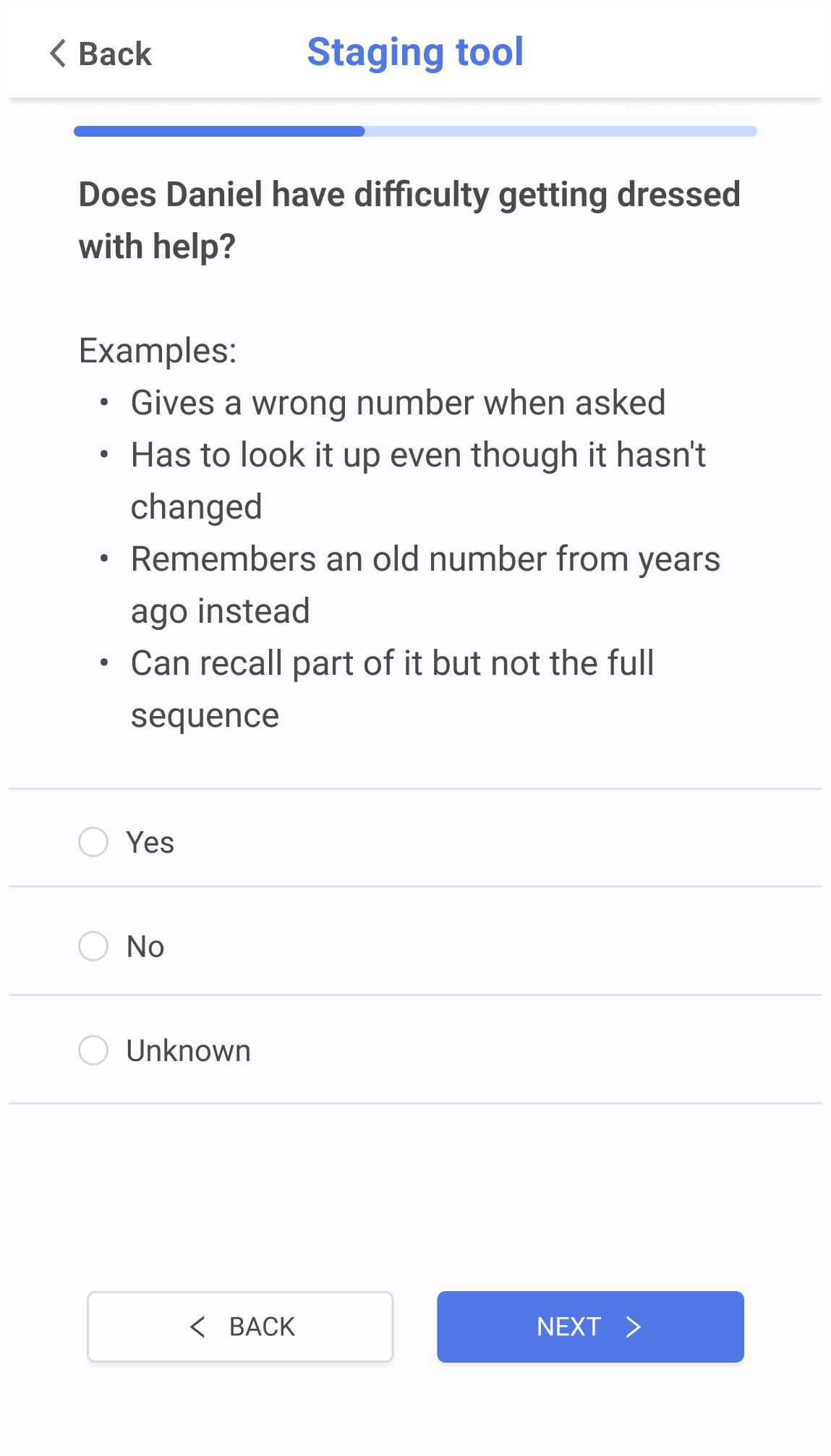
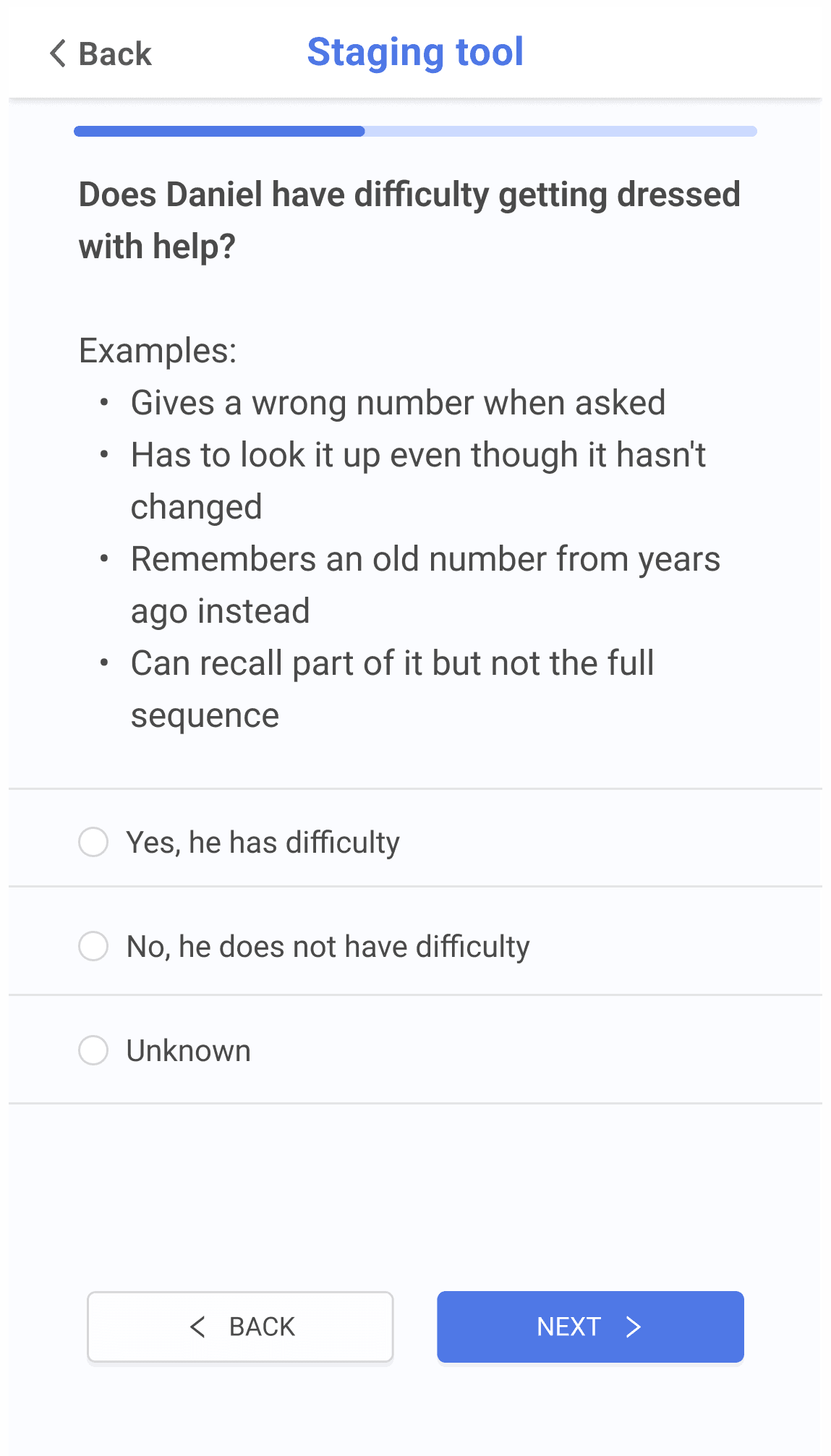
The staging tool used simple Yes/No responses. During testing, a participant read "Does Daniel have difficulty remembering his phone number?" and answered No, reasoning that the scenario described someone who "remembers the past more than the present."
The question asks about difficulty, not ability. One word was causing systematic data entry errors that would invalidate the staging result entirely.
Fix: expanded response options to "Yes, he has difficulty" / "No, he does not have difficulty." A small change with a significant impact on the integrity of the tool.

2. ONBOARDING FOR USERS WHO DON'T READ TUTORIALS
The original onboarding was a standard overlay tutorial. In testing, users tried to interact with content behind the overlay, did not register what they had read even when they read it aloud, and later could not recall basic facts the tutorial had communicated.
The insight: for users with limited app experience, the right model is not "read the instructions." It is "watch someone do it first." Planned solution: replace the text tutorial with a short video that approximates being shown by a trusted person how to use the app.


3. NAVIGATION FOR USERS WHO DON'T KNOW WHAT A HAMBURGER MENU IS
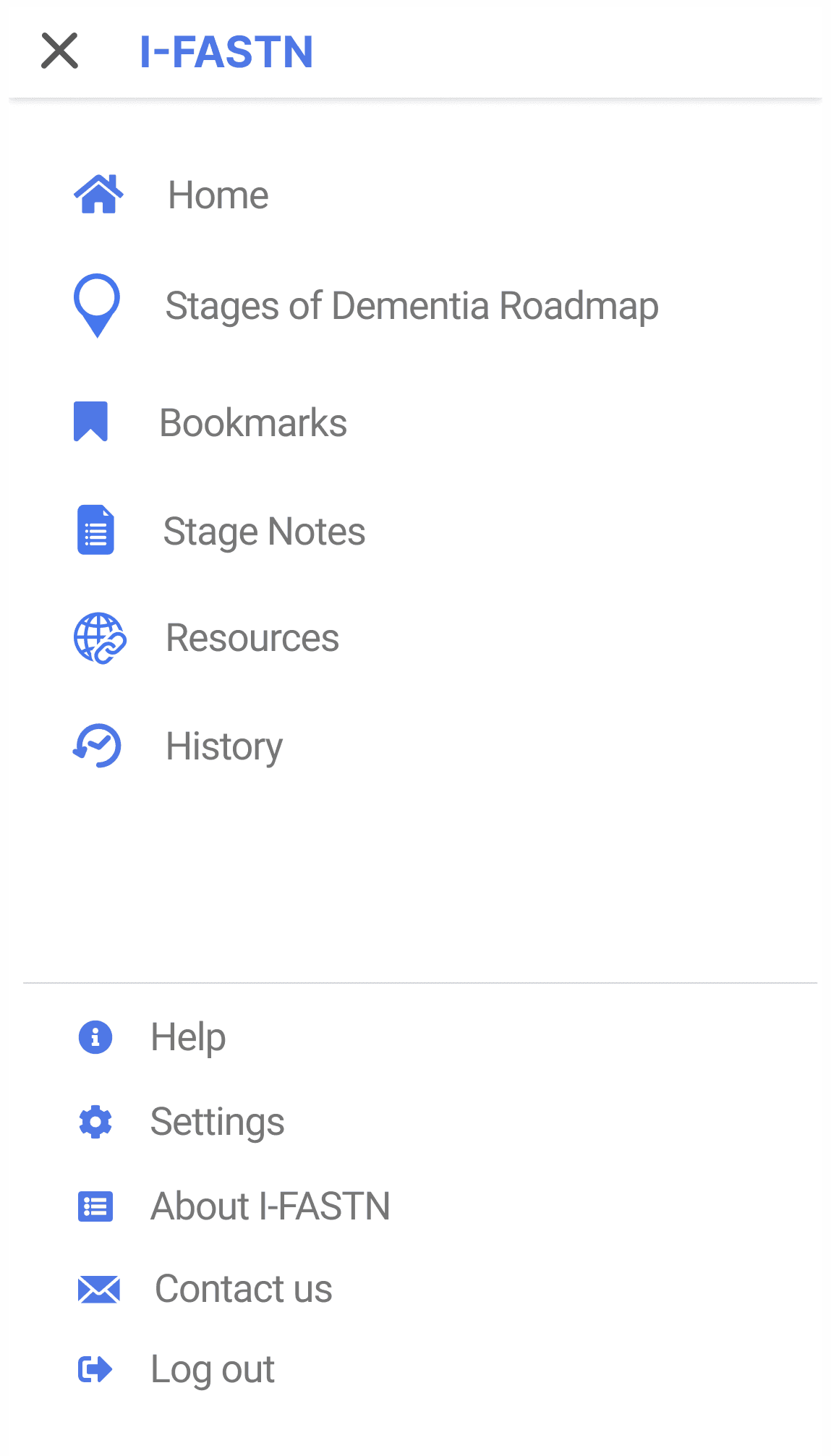
The app used a side menu accessed via a hamburger icon. Standard pattern. Nearly invisible to this audience. Participants could not find Settings, could not return to visited sections, and did not know the menu existed even after the tutorial showed it to them.
Solution: move all primary navigation onto the home screen. Trade conventional mobile patterns for explicit, visible affordances that match the mental models of users who are not operating on app conventions.


SOLUTION
Four core experiences: a guided Staging Tool with reworded response options for error prevention; a visual Dementia Roadmap showing all stages with the current stage marked; per-stage pages with an illustrative pictogram, concise bullet points, a notes function, and curated resources in English or Spanish; and a home screen navigation architecture redesigned for users at every level of digital literacy.
OUTCOME
Caregivers rated the app 4.6 to 4.7 out of 5 on two validated usability scales. More meaningfully, they reported that the app filled a gap doctors rarely addressed: clear, practical, stage-specific information at the moment they needed it, not a starting point for an overwhelming search.
PUBLICATION AND SHOWCASE
The heuristic evaluation and usability testing findings were published in the Journal of Gerontological Nursing (2023). My design contributions are acknowledged in the publication. The prototype was selected for presentation at the New York Academy of Medicine's Third Annual Urban Health Informatics Innovation Exhibit and Conference (April 2019), chosen from a competitive abstract review as one of eight innovations showcased.
REFLECTION
Working in a research context meant design decisions moved at research pace. Iterations happened between formal evaluation sessions, not in continuous cycles.
The users pushed harder than any professional product user would. Low digital literacy, emotional overwhelm, bilingual requirements, and real stakes. A wrong staging result has downstream consequences for care decisions. Designing for that audience meant questioning assumptions I had not realized I was making: that "Next" is self-evident, that a hamburger menu is findable, that plain language is plain enough.
The unresolved question: the app was not usable for all participants. Some needed analog alternatives alongside the digital tool. Where the app ends and human support begins is still an open design problem, and the one I think about most from this project.
Accessibility isn't achieved by simplifying interfaces alone, it comes from designing for the user's real-world capabilities.